Videobox allows you to quickly and easily download Flash video from most all of the popular video sites on the internet. Videobox will convert the video into a native Quicktime format so it’s ready to view on your Mac, iPod, iPhone or iTunes.


OVERVIEW


Videobox allows you to quickly and easily download Flash video from most all of the popular video sites on the Internet. Videobox can convert the video into the Quicktime format so it’s ready to view on your Mac, ipod, iphone or in iTunes. Videobox can also convert files to other popular video file formats – mpeg, mov, 3g2, mp4, wmv, flv, & avi.

You can also choose to automatically Import your downloaded videos to iTunes.


After you install Videobox and the Videobox Safari Extension, the extension will put a small TV set icon button onto your Safari toolbar.


When viewing a video in Safari just click the button and Videobox will add the video to the Videobox Downloads queue for processing using your default settings.


INSTALL


Installation is easy. After downloading Videobox just click on the videbox.dmg file in your downloads folder to launch the Videobox installer. On the Videobox installation screen drag the Videobox icon and drop it onto the Applications folder icon on the installation screen and you are done. On some systems the .dmg file might put a virtual disk on your desktop named Videobox. Click on the virtual disk to launch the Videobox installer. When done you can right click the virtual Videobox disk icon on your desktop and select “Eject” or just drag it to you Trash Bin to eject it.


SETUP


To set up the default Preferences for Videobox, launch Videobox and open the Videobox menu by clicking on “Videobox” in your Mac toolbar. Select “Preferences…” from the Videobox dropdown menu.


he basic Default Output Settings screen has a single set of preset options. Available preset Output options are:


  1. Download only (no conversion)

  2. iDVD – iMovie

  3. iPad

  4. iPod classic

  5. iPod Touch – iPhone

  6. Mac Viewing

  7. Nintendo Wii

  8. Playstation 3

  9. PSP

  10. Xbox 360

The initial settings for each of these options have been optimized for most users and should give satisfactory results for your intended use. You can customize them by clicking the “Show Settings” (recommended for experienced users only) to expand the Default Output Settings screen. Incompatible settings can cause video distortion or conversion failures. Any changes you make will remain in effect until you change them or you can go back to the original factory settings by using the “Revert to Factory Defaults” button on the “Download” screen.


VideoBox 4.2.2


VideoBox 4.2.2


VideoBox 4.2.2  Mac OS X |  MB


HomePage  Download


VideoBox 4.2.2

Winclone Pro 5.4 – Complete Backup Solution for Boot Camp


Winclone Pro 5.4


Winclone allows you to clone your Boot Camp partition. It also includes Windows 7 and 8.1 cloning!


Winclone 5 is the most complete solution for protecting your Boot Camp Windows system against data loss. Winclone is the most reliable cloning solution when migrating Boot Camp to a new Mac. The all new Winclone Backup feature provides scheduled, incremental snapshots of your files so you can retrieve earlier versions or accidentally deleted data. Winclone Backup is included with every edition of Winclone 5.


Winclone 5 Pro includes a package installer for managed deployment of Boot Camp to multiple Macs. Winclone packages can be deployed using all the Mac management tools available today. If you can deploy a package, you can deploy a Boot Camp partition.


Complete Backup Solution


Winclone 5 is the most complete solution for protecting your Boot Camp Windows system against data loss. Winclone is the most reliable cloning solution when migrating Boot Camp to a new Mac. The all new Winclone Backup feature provides scheduled, incremental snapshots of the Windows User folder for retrieval of earlier versions or deleted data.


Features:


  • Clone Windows 7 (64-bit only) or 8.1 with ease.

  • Clone to your Boot Camp partition either on a separate drive or on the same that contains your OS X partition.

  • Creates image documents that can be stored on any media and double-clicked to open in Winclone.

  • Verbose logging so you know what is going on.

  • Built on the open source ntfstools, which are included in Winclone, so you don’t have to install anything else.

  • Fast: Restore a 10 GB image in less than 10 minutes.

  • Create a Boot Camp partition from within Winclone.

  • Do it all from the boot drive: You don’t need to boot from a Firewire drive to clone the Windows partition.

  • Clean, uncomplicated, and updated user interface

  • Support for OS X Core Storage volumes

  • Performance optimizations

  • Winclone Backup feature for scheduled, incremental backup of Boot Camp user files

  • Winclone Basic and Pro editions also available

System Requirements


Current Version: Winclone 5.4


Boot Camp Partition


Mac OS X 10.9 or later including OS X El Capitan


Windows 7 (64-bit) on supported Mac hardware


Windows 8.1, Windows 10


Need Winclone for previous versions of OS X or Windows? Email us.


Winclone Pro 5.4


Winclone Pro 5.4 Mac OS X | 9.3 MB


HomePage  Download

Winclone Pro 5.4


EXIF SYNC 1.0 for Mac


Modern digital cameras store information about the time when each shot was taken directly within the image files. This data is used, for example, to sort photos in the correct order.


People often use several cameras to photograph the same event, such as an exhibition, a party, or a trip. Each of the cameras used may have a different date and time set, and it may be difficult to combine a series of pictures taken with different cameras to form a continuous photo report.


The ability to easily correct date and time data is also important if you want to:


  • Upload photos to online image storage and sharing services.

  • Store and sort images files on your computer.

  • Use image organizers that keep your images sorted according to the date when the shots were taken.

  • Take pictures without worrying about your camera’s time settings

With EXIF Sync, correcting time records is no longer a problem — the application allows you to align the times of shots taken with different cameras in just a few clicks. The date and time data will be changed in the image files themselves.


Modern digital cameras store information about the time when each shot was taken directly within the image files. This data is used, for example, to sort photos in the correct order.

People often use several cameras to photograph the same event, such as an exhibition, a party, or a trip. Each of the cameras used may have a different date and time set, and it may be difficult to combine a series of pictures taken with different cameras to form a continuous photo report.

The ability to easily correct date and time data is also important if you want to:

•Upload photos to online image storage and sharing services.

•Store and sort image files on your computer.

•Use image organizers that keep your images sorted according to the date when the shots were taken.

•Take pictures without worrying about your camera’s time settings.

With EXIF Sync, correcting time records is no longer a problem — the application allows you to align the times of shots taken with different cameras in just a few clicks. The date and time data will be changed in the image files themselves.


EXIF Sync 1.0


EXIF Sync 1.0 Mac OS X | 6.5 MB


HomePage  Download

EXIF Sync 1.0

Uninstall your apps easily.


AppCleaner is a small application which allows you to thoroughly uninstall unwanted apps.


Installing an application distributes many files throughout your System using space of your Hard Drive unnecessarily.

AppCleaner finds all these small files and safely deletes them.


Simply drop an application onto the AppCleaner window. It will find for the related files and you can delete them by clicking the delete button.


Version 3.0.2:
  • Fixed a crash which could occur in some rare cases.

  • Fixed: Preferences Panes are no longer listed twice.

Version 3.0:


  • Requires OS X Yosemite or greater.

  • Supports OS X El Capitan.

  • Redesigned UI.

  • Enhanced search engine.

  • Available only in English for now. Other localizations will be added later.

Requirements


  • Intel, 64-bit processor

  • OS X 10.10 or later


appcleaner


AppCleaner 3.0.2  Mac OS X | 2.04 MB


HomePage  Download

AppCleaner 3.0.2

Disk Cleaner 1.1


We take pride in bringing you the best experience on Mac OSX with our Millions of Happy Users


Free your hard drive space and clean your cache!


  • #1 Customizable disk cleaner on Mac App Store

  • The only fully optimized and customizable disk cleaner

  • Featured on EatAppleNews, Brothersoft, and many more!

Color Accent Studio Pro


Add a touch of color to your photos


  • Add a touch of color for dramatic effect.

  • Paint color to black and white photos.

  • Add custom colors to your photos.

Duplicate File Cleaner


Find and delete your duplicates


  • #1 Fastest duplicate scanning alogrithm on Mac App Store!

  • True SHA-1 checksum file compare for pinpoint accuracy

  • Scans Photos, iPhotos and iTurnes library for duplicates

Superimpose Studio Pro


Combine any photo


  • Superimpose your photos!

  • Combine photos into professional quality photomontages

  • Featured on EatAppNews, BrotherSoft, and many more!

Privacy Guard


Secure deletion for your Mac


  • United States Department of Defense Method for secure deletion

  • Cover your tracks, browsing history, and private information

  • Stop spammers and advertisers from spying on your system

Green Screen Studio Pro


Chromakey Green Screen on Mac


  • Chromakey algorithm replaces your green screen with any background

  • Manual tools for editing images with no green screen

  • Featured on Macworld, EatAppleNews, and many more!

BitMedic Antivirus & Malware Security


#1 AntiVirus App for Mac


  • #1 Fastest and most secure Real-time AntiVirus App for Mac. Tested & certified.

  • Virus database updated multiple times per day. 24/7 real-time protection.

  • Awarded Best New AntiVirus App!

Alarm Clock & Sleep Timer


Beautifully designed alarm clocks


  • Supports multiple alarms and custom sounds

  • Fall asleep to ambient noise using the sleep timer

  • Beautifully designs full screen animations to promote better sleep

What’s New in Version 1.1


◎ optimized our scanning algorithm. even faster and more efficient!

◎ fixed all memory leaks. older machines may have experienced memory leaks and we’ve fixed them for you! :)


For any questions, suggestions, or bugs, please email us at support@pocketbitsllc.com. We cannot respond directly to user reviews, so we encourage you to email us directly for the fastest response. We want to hear your thoughts and make improvements to future versions of this app to keep you happy. We plan to make active updates powered by your love and support! Every bit helps! :)


screen800x500 (5) screen800x500 (6) screen800x500 (8) screen800x500 (7)


Disk Cleaner 1.1 Mac OS X |  MB


HomePage  Download

Disk Cleaner 1.1

El Capitan Cache Cleaner 10.0


El Capitan Cache Cleaner is an award winning general purpose tool for Mac OS X.  ElCC makes system maintenance simple with an easy point and click interface to many OS X functions.  Novice and expert users alike will appreciate the powerful toolset ElCC provides.  El Capitan Cache Cleaner is one of the world’s leading maintenance tools with millions of downloads around the globe.


Maintenance


El Capitan Cache Cleaner is a one stop solution for all of your OS X maintenance needs.  Intel or PPC, Tiger or El Capitan, ElCC has the tools to keep your system running at its best.  ElCC Documents and the ElCC Engine maintain system health by providing full automation of common maintenance chores including virus scanning of internet downloads.  The ElCC Engine can even repair permissions automatically after software installations.  With the ElCC Engine, powerful system maintenance and antivirus can be completely transparent or as close as your menu bar.


Optimization


El Capitan Cache Cleaner can improve system performance by tuning internet and file cache settings, implementing ram disks, and cleaning out various cached and stale data.  ElCC includes tools to help optimize files and memory.  ElCC can recover wasted disk space by eliminating language localization files and slimming Universal Binaries.


Customization


El Capitan Cache Cleaner lets you control your OS X experience.  Turn off Spotlight or Dashboard, or turn on a Login Items Folder.  ElCC can tweak many OS X features to suit your tastes.  All without permanently altering or harming your system.


Disaster Planning


El Capitan Cache Cleaner lets you create a bootable Installer USB drive from your El Capitan download that will boot and install El Capitan on any supported machine.  El Capitan Cache Cleaner lets you create bootable Emergency Disks that include system repair utilities and ElCC’s powerful cache cleaning functions.  If disaster strikes, the power of El Capitan Cache Cleaner is available at the command prompt in Single User Mode.  Registered users of ElCC can install a portable version on a flash drive or iPod.  El Capitan Cache Cleaner Portable runs on any supported Mac and is a great tool for testing hard drives, screen pixels, batteries,  ram, and more before buying a machine.


Antivirus


El Capitan Cache Cleaner helps protect your system from malware.  ElCC adds three additional layers of malware protection to El Capitan, and ships with the powerful ClamAV antivirus built in.  ElCC can scan your downloads on the fly providing industrial strength virus protection from Mac and Windows threats.


And even more features…


Read the Users Manual


ElCCicon512 (1)


El Capitan Cache Cleaner 10.0 Mac OS X |  MB


HomePage  Download

El Capitan Cache Cleaner 10.0

BBEdit 11.1.3 – Powerful text and HTML editor


BBEdit 11.1.3 is the leading professional HTML and text editor for the Mac. Specifically crafted in response to the needs of Web authors and software developers, this award-winning product provides a plethora of features for editing, searching, and manipulation of text. BBEdit transforms text with high performance.


An intelligent interface provides easy access to BBEdit’s best of class features including grep pattern matching, search and replace across multiple files, function navigation and syntax coloring for numerous source code languages, FTP and SFTP open and save, AppleScript, Perl, and OS X Unix scripting support, glossary support, and a complete set of HTML tools.


What’s new in BBEdit 11?


Lots. Here’s a summary of the high points, but we encourage you to read the complete change notes.


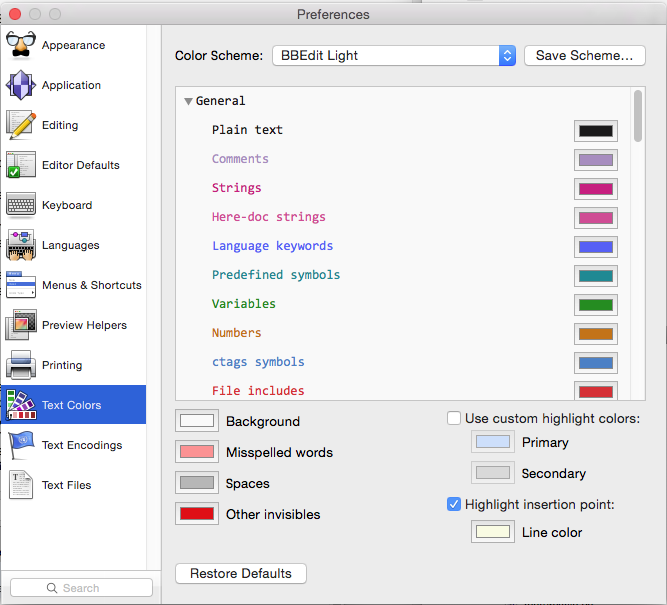
  • Improved syntax coloring – The internal syntax coloring mechanics have been extensively reworked, allowing for a much greater selection of core color types, and now allowing language modules to add their own color types. Support for color schemes has been expanded, and several factory color schemes are included.


Text Colors Preferences Image


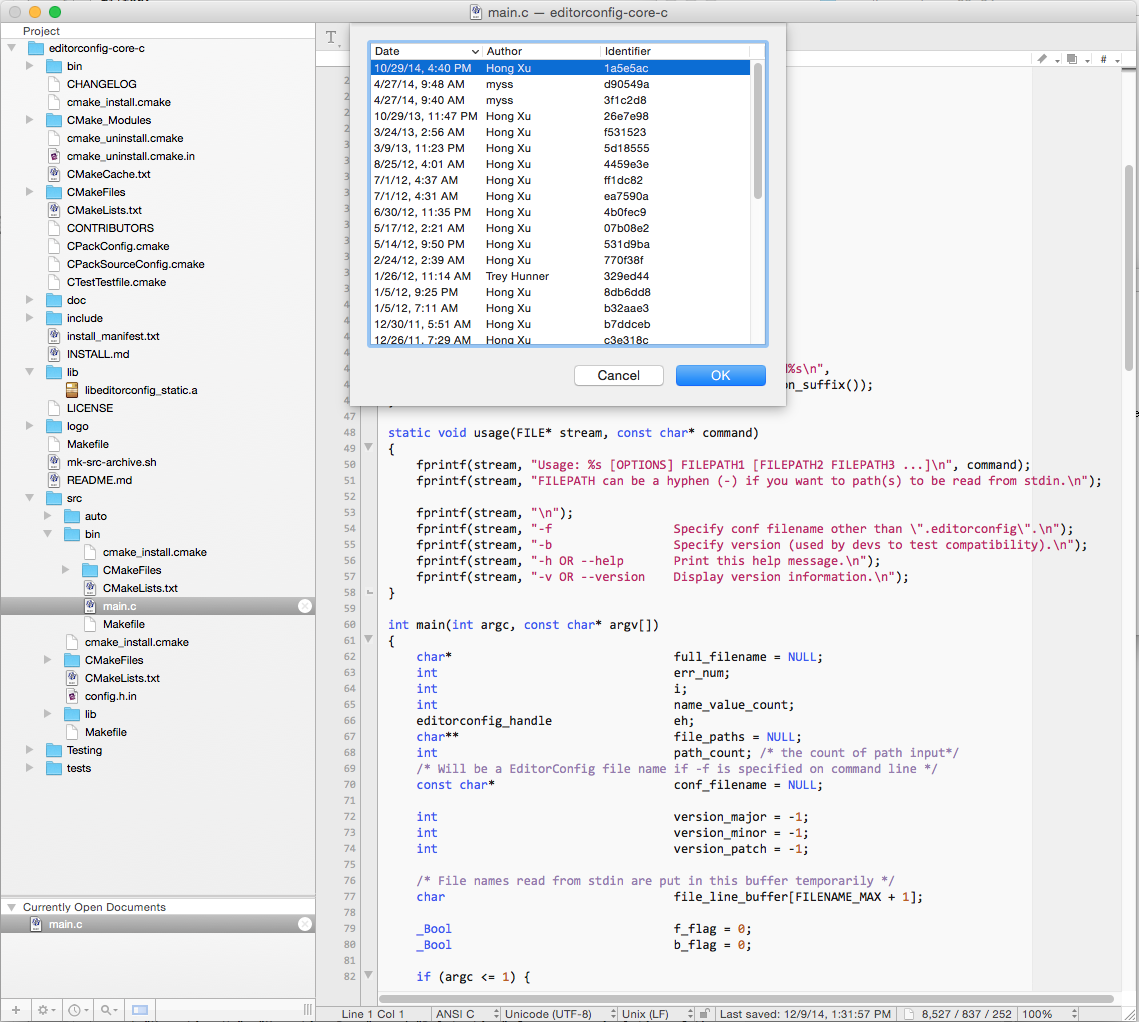
  • Git support – BBEdit now has built-in support for Git, to make many common operations available without having to switch applications.

BBEdit 11.1.3


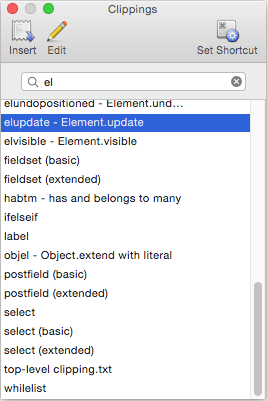
  • New Clippings system mechanics – The Clippings system (used for creating, managing, and applying frequently used “snippets” of text) is now even more powerful and flexible. Any clipping set can be made available universally or on a per-language basis (for any desired set of languages). The Clippings palette, text completion system, and the “Insert Clipping” command have been extended to support this additional flexibility.

Clippings Palette Image


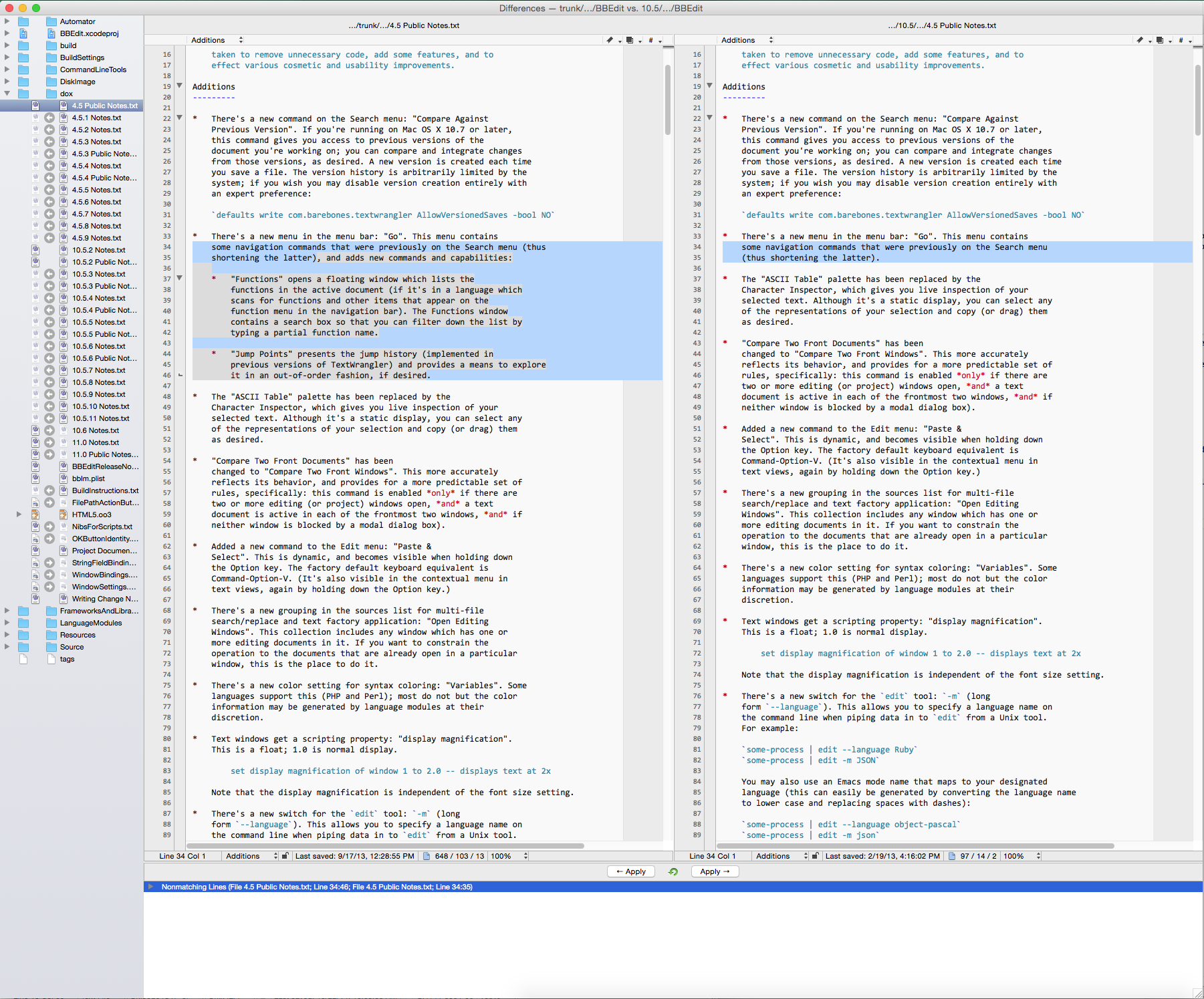
  • New UI for Find Differences – The “Find Differences” dialog box has been modernized, and folder comparisons are faster than ever, thanks to a rewritten and newly performance-tuned comparison engine. The most significant changes are in the results interface, however: an all-new single window presentation is much easier to use for folder comparisons, is easier to manage, and (for folder comparisons) provides the ability to copy files as needed from one folder to another.

Find Differences Results Image


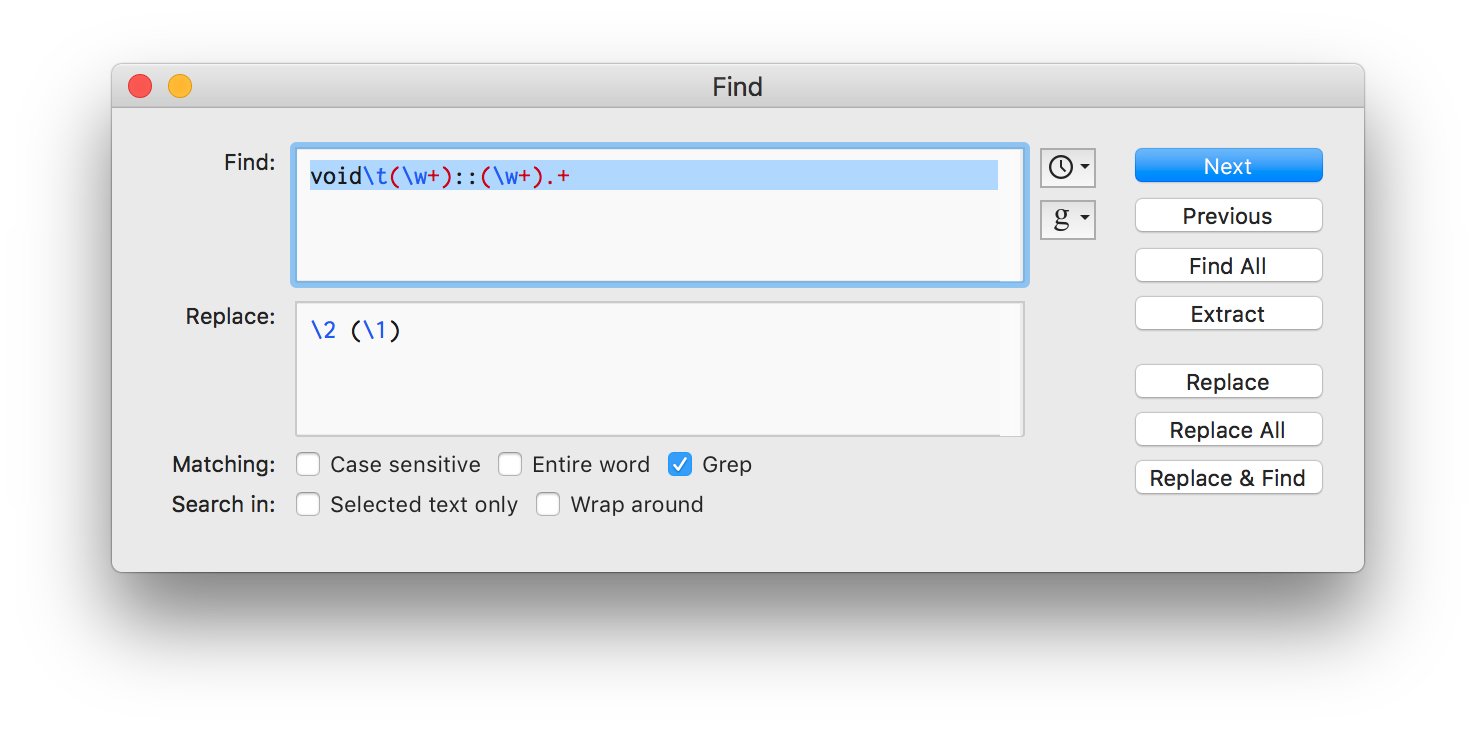
  • Text Extraction – This powerful addition to BBEdit’s legendary searching capabilities allows you to locate and collect search results into a single text document. Extraction can be run on the active text document, or across multiple files and folders.

Find Window with Extract Image


(click the image above to see it full size in a new browser tab)


  • Numerous Editing Enhancements – Many subtle but highly productive editing features have been added, including (but by no means limited to):
    • automatic highlighting of matching text (for a selection, or the word surrounding the insertion point)

    • “Move Line Up”, “Move Line Down”, and “Delete Line” for easy manipulation of the line containing the current selection (or multiple selected lines)

    • “New Line Before” and “New Line After” commands for even easier composition


  • Extensive Internal Modernization – Dialog boxes, floating palettes, and many internal subsystems have been rewritten or updated to support new features, improve performance, add refinement, and make future enhancements possible.

In all, BBEdit 11 contains over two hundred additions, changes, and refinements. The detailed change notes contain complete information on what is new and changed in this version.


BBEdit 11.1.3


BBEdit 11.1.3 Mac OS X | 11.5 MB


HomePage  Download

BBEdit 11.1.3 Mac OSX